
You’re filling in an employment form when it asks for your Payroll Number. You open your latest payslip, find several different codes and realise none is clearly labelled. It’s a small detail, but surprisingly awkward when you need an answer quickly.
The easiest way to find your Payroll Number is to check your payslip or employee payroll portal. Look near your name, employment details or a field marked ‘Employee No.’, ‘Payroll ID’ or ‘Works No.’. If you cannot find it, contact your employer’s HR or payroll department.
Not every employer uses or displays a Payroll Number in the same way.
This guide explains where to look, which numbers not to confuse and what to do when your payroll details aren’t available.
What is a Payroll Number?
A Payroll Number is a reference used by an employer to identify someone in its payroll records. It helps payroll staff find the correct employment record when processing wages, checking deductions or answering questions about pay.
Think of it as a workplace reference rather than a government-issued personal identification number.
For example, an employer might assign someone the Payroll Number 004718. Another business might use EMP04718 or a completely different format.
There is no universal UK Payroll Number format. Employers choose how to organise their internal identifiers, and not all businesses display a separate number to employees.
You might also encounter the terms:
- Employee number or employee ID: A reference used in an employer’s HR or staff administration system.
- Works number: A traditional term that may refer to an employee’s payroll identifier.
- Payroll ID: A term also used in HMRC’s Real Time Information (RTI) reporting system.
These terms sometimes describe the same number, but you shouldn’t assume they’re interchangeable.
For example, a large employer might give you one employee ID for staff systems and a different payroll reference for processing wages. If a form specifically requests your Payroll Number, the payroll team can confirm which identifier it expects.
MoneyHelper’s guide to understanding your payslip also explains that some employers use payroll numbers to identify people on their payroll.
Where can I find my Payroll Number on a payslip?
Your latest payslip is usually the best place to start. If your employer prints an employee identifier, it will often appear near your name, department or other employment details.
Start at the top of the document rather than searching through your tax deductions.
Look for labels such as ‘Payroll No.’, ‘Employee Number’, ‘Employee ID’, ‘Staff No.’ or ‘Works Number’.
The wording depends on your employer’s payroll software and the layout it uses.
Example: Where a Payroll Number might appear
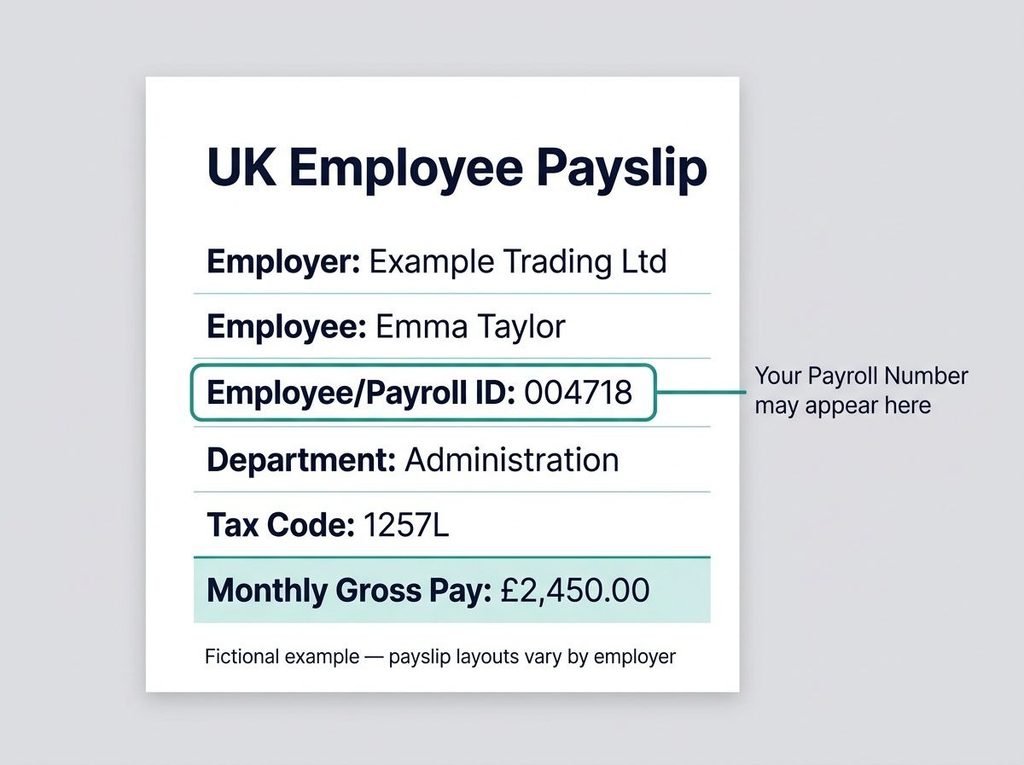
Imagine Emma Taylor works for a UK business and receives a monthly payslip. The following is a fictional excerpt showing how her details might be arranged.
Illustrative payslip excerpt — Emma Taylor
| Payslip field | Example information |
| Employer | Example Trading Ltd |
| Employee name | Emma Taylor |
| Employee/Payroll ID | 004718 ← Look here |
| Department | Administration |
| Pay date | 30 October 2026 |
| Tax code | 1257L |
| Monthly gross pay | £2,450.00 |
This excerpt is entirely fictional. The employee identifier and salary are invented, and 1257L is a valid example of a UK tax-code format, not necessarily the code Emma would receive. The illustration deliberately excludes deductions and net pay; it is not a complete payslip or a mandatory UK payslip layout.
The important detail is 004718. That’s the number Emma would check with payroll if asked for her Payroll Number.
It’s not the same as her tax code, which tells her employer how to calculate PAYE Income Tax deductions.
Does a Payroll Number have to appear on a payslip?
No. UK law does not require every payslip to display a Payroll Number.
Under the government’s payslip requirements, employers must provide information about gross pay, deductions, net pay and hours worked where pay varies according to time worked. Additional statutory details may also apply to the deductions and payment methods used.
Employers can include extra information, such as National Insurance numbers, tax codes and employee references, but a Payroll Number is not itself a compulsory field.
That distinction matters. If your payslip has no Payroll Number, it doesn’t automatically mean the payslip is unlawful or that your employer has made a mistake.
It may simply be a different payroll layout.
Other places to check for your Payroll Number
A missing number on your payslip doesn’t necessarily mean you have no payroll identifier.
Several other records are worth checking before contacting HR.
Your employee self-service portal
Many employers provide payslips and employment information through an online HR or payroll system.
Once you’ve signed in through your employer’s official portal, look under sections such as:
- My Profile or Personal Details
- Employment Information
- Payroll or Pay Details
- Payslips and Documents
Some systems display an employee reference prominently. Others keep it within your employment profile or downloadable payslip.
Don’t assume your portal’s login username is automatically your Payroll Number. The same applies to a staff badge or clocking-in reference.
Your employment and onboarding documents
Check your offer letter, joining instructions, onboarding emails and employment records. A payroll or staff number may have been provided when your employer created your account.
Not every employer includes this information in an employment contract, so its absence isn’t unusual.
You may also find a relevant identifier on an approved timesheet, internal staff form or workplace correspondence.
If you’re unsure whether a number refers to payroll or another system, ask rather than guessing.
How do I find my Payroll Number without a payslip?
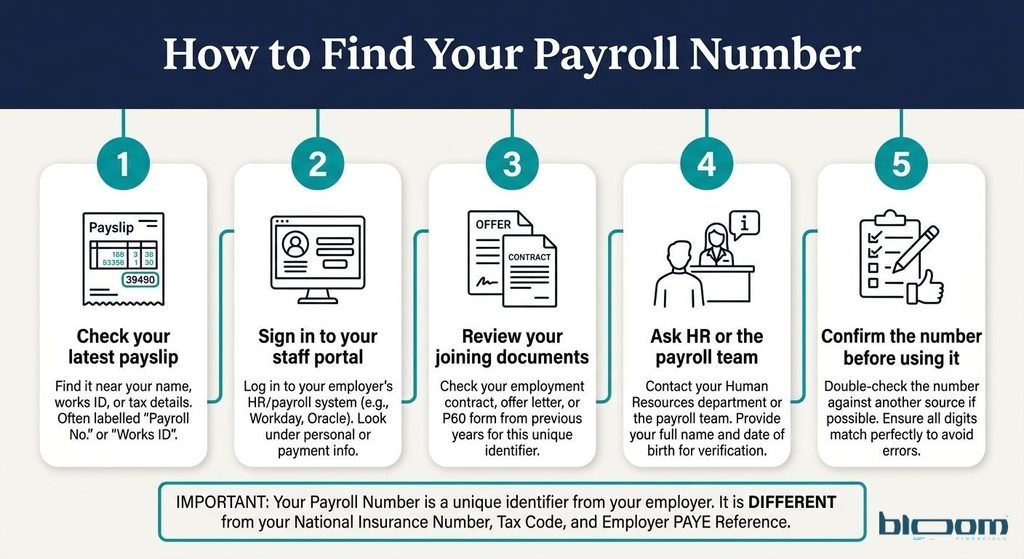
Contact the department responsible for your wages. It can check your employment record and confirm whether you have a Payroll Number.
Before doing that, consider which of the following situations applies to you.
You’re a new starter
Suppose you’ve joined a company on Monday and an onboarding form asks for your Payroll Number on Tuesday.
You might not have received your first payslip, and your employer may still be completing its payroll setup.
Ask HR whether your identifier has already been assigned. If it hasn’t, request advice on how to complete the form.
Employees and workers generally have the right to receive a payslip on or before their first payday, not necessarily on their first day at work.
You’ve left your previous employer
Leaving a job often means losing access to the staff portal that held your payslips.
Check any payslips you’ve downloaded, final-pay correspondence or employment records you kept.
If you still cannot find the number, contact your former employer’s payroll or HR department.
Your P45 may help identify the previous employer and its PAYE scheme, but don’t assume it contains your individual Payroll Number. A P60 is likewise not a guaranteed source of that reference.
Give your former employer enough information to locate your record and ask how it prefers to verify your identity securely.
You work through an agency
If you work through a recruitment agency, start with the organisation that actually pays your wages.
Acas explains that agency workers normally receive payslips from their agency.
For example, you might complete shifts at a distribution warehouse while a recruitment agency processes your pay. The warehouse’s staff badge number might have nothing to do with your payroll identifier.
If an umbrella company employs and pays you, its payroll department may hold the relevant reference instead.
Check the employer or payroll provider named on your payslip or employment documents before contacting the right team.
You have two separate jobs
If you work for a supermarket during the week and a restaurant at weekends, you may have a different Payroll Number for each job.
Each employer maintains its own records. Your number from one job won’t automatically identify you in another employer’s system.
Even when someone has two separate employments within the same employer’s PAYE scheme, HMRC’s reporting guidance says distinct payroll IDs should be used where such IDs are assigned.
Always check which employment a form refers to.
You cannot access electronic payslips
If you receive payslips through an app but have forgotten your password, start with your employer’s normal account-recovery process.
If that doesn’t work, ask payroll to provide an accessible copy or confirm your identifier through an approved channel.
Acas advises that an employer should offer another format, such as paper, when an employee cannot access their online payslips.
A quick decision guide
| Your situation | Best next step |
| You have a recent payslip | Check the personal or employment details section. |
| You can access your staff portal | Look under your profile or payroll records. |
| You have neither | Contact HR, payroll or the organisation paying your wages. |
| You’re a new starter | Ask whether a payroll identifier has been assigned yet. |
| You’ve left the business | Check saved payslips, then contact your former employer. |
| You can see several different numbers | Ask payroll which one the form requires. |
You do not need to identify a number by its length or appearance alone. Confirmation from the employer is more reliable.
Payroll Number vs employee ID, National Insurance number and PAYE reference
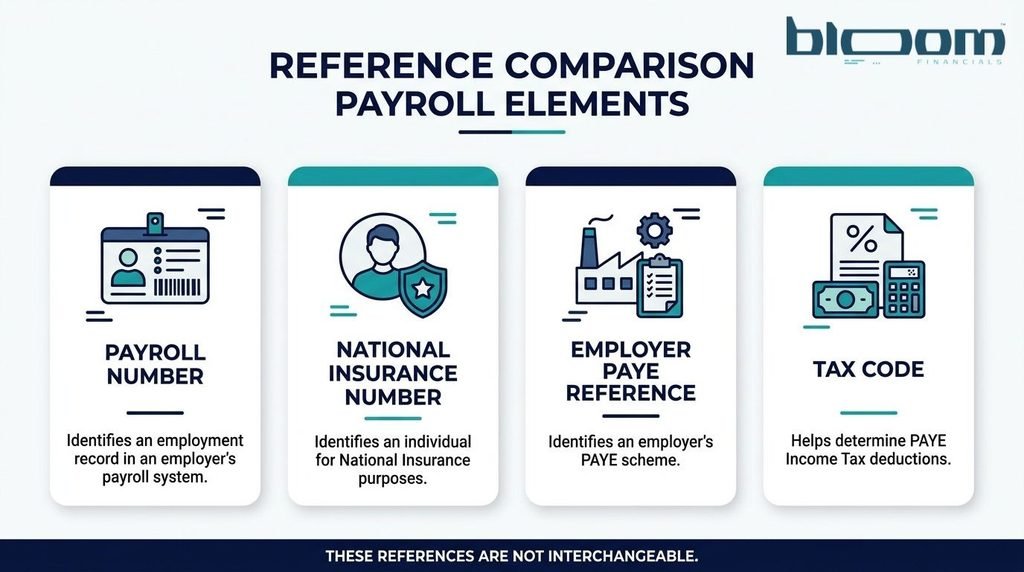
One reason Payroll Numbers cause confusion is that payslips contain several references that serve entirely different purposes.
A code can look official without being the number you need.
Here’s how to tell them apart.
| Reference | What it identifies | Who uses it | Where you might find it |
| Payroll Number | An employee or employment record within an employer’s payroll system | Employer and payroll team | Payslip, payroll portal or employment records, if displayed |
| Employee ID | An individual within an employer’s staff system | HR and workplace administrators | Staff profile, ID card or employment documents |
| National Insurance number | An individual’s National Insurance record | HMRC, DWP and employers | Payslip, HMRC records or official correspondence |
| Employer PAYE reference | An employer’s PAYE scheme | HMRC and the employer | Employer correspondence, sometimes payslips, P45 or P60 |
| Tax code | Instructions used to work out PAYE Income Tax deductions | HMRC and employer | Payslip, tax-code notice or HMRC account |
| RTI Payroll ID | A particular employment record in payroll submissions | Employer and HMRC | Employer’s payroll software and FPS records; it may match the visible payroll identifier |
Is a Payroll Number the same as an employee number?
Sometimes, but not always.
A small business might use a single number across payroll, HR and staff records. A larger organisation might maintain different identifiers for each system.
If your payslip says ‘Employee No.’, it may well be the reference you need. However, you should confirm this if another document specifically asks for a Payroll Number.
Is a Payroll Number the same as a National Insurance number?
No.
Your National Insurance number identifies you within the UK’s National Insurance and tax-related systems. It generally stays with you throughout your life.
Your Payroll Number belongs to an employer’s payroll arrangements. It may change when you change jobs.
A National Insurance number cannot be converted into your Payroll Number.
The same principle applies to an employer PAYE reference. That reference identifies an employer’s PAYE scheme, not your individual employment record.
An employee might see several codes on the same payslip, but their presence doesn’t reveal how the employer has assigned its internal identifiers.
What should I do if my Payroll Number is missing or incorrect?
First, check whether the number is genuinely absent or simply labelled differently.
If you’ve found one on an older payslip but a different reference appears on your latest payslip, keep both documents and ask payroll whether the change was intentional.
Don’t alter your payslip yourself or enter a guessed number on an important employment form.
For example, imagine your previous payslip shows 004718 while your newest one displays 009204. That could reflect a payroll-system change, a different internal identifier or a record that needs checking.
The sensible response is to ask payroll to confirm which reference is current and whether the employment record has been updated correctly.
How to ask HR for your Payroll Number
You don’t need a lengthy explanation. A short message is usually enough:
Subject: Request to confirm my Payroll Number
Hello Payroll Team,
Could you please confirm the Payroll Number associated with my employment?
My name is [full name], and I work in [department/location]. I need the reference to complete an employment form.
Please let me know if you need any additional information to verify my identity.
Many thanks,
[Your name]
Use your employer’s official email address, HR portal or established contact process.
Avoid including your National Insurance number, date of birth, bank details or copies of identity documents in an initial request unless they’re genuinely required through an appropriate secure process.
What if the wrong number is linked to your records?
Ask payroll to check the employee profile, employment history and relevant payroll submissions.
A number being wrong does not, by itself, prove that you’ve been paid incorrectly. However, a record mismatch deserves attention, especially if it coincides with missing payslips, an unexpected employment entry or tax information that looks wrong.
The payroll team should establish whether the problem is limited to a visible staff reference or also affects information sent to HMRC.
Can my Payroll Number change?
Yes. Your Payroll Number may change, particularly when you move to a new employer or your existing employer reorganises its payroll system.
Common reasons include a change of payroll software, a new payroll provider, a business restructuring or a change in how employee records are managed.
But a number changing on your payslip doesn’t necessarily mean HMRC has been told you’ve started a new job.
The important distinction is whether the change affects an internal reference only or the payroll ID reported to HMRC.
For an ongoing employment, HMRC recommends keeping the same reported payroll ID where possible. If an employer must change it, the change needs to be reported correctly.
A different situation arises when someone leaves and is later re-employed. HMRC says that, where payroll IDs are assigned, the new employment should have a different payroll ID rather than reusing the old one.
Employees generally don’t need to manage these reporting arrangements themselves. Their employer or payroll provider should handle them.
Why Payroll Numbers matter to UK employers
For employees, a Payroll Number is mainly a convenient way to identify their records.
For employers, it can also help preserve the link between payments and the correct employment when information is reported to HMRC.
Payroll IDs and Real Time Information
Under Real Time Information (RTI), employers report payroll information to HMRC using submissions such as the Full Payment Submission (FPS).
The FPS includes information about employees, their pay and relevant tax and National Insurance deductions.
HMRC’s guidance on payroll information to report explains how payroll IDs should be handled when they’re assigned.
The critical point is consistency.
HMRC’s guidance published on 22 October 2026 warns that changing a payroll ID without correctly linking it to the previous reference may lead to duplicate employment records.
That can produce differences between an employer’s payroll information and HMRC’s records, potentially creating disputed PAYE charges and additional correction work.
What should employers do when changing payroll software?
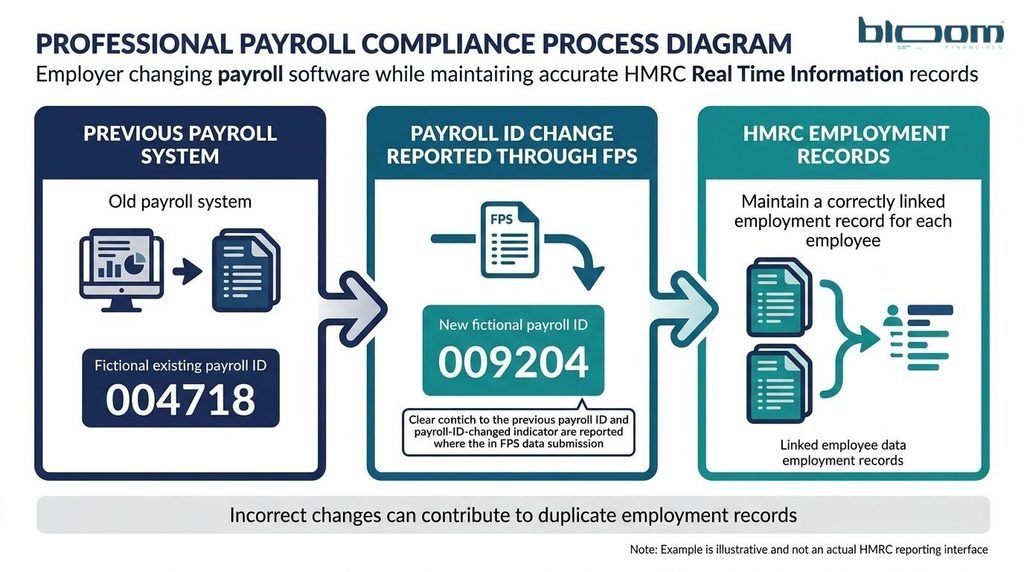
Consider a business moving from one payroll provider to another.
The previous system recorded a particular employment under 004718. The replacement system automatically assigns 009204.
If the employer simply reports the new identifier as though it were unrelated, HMRC may treat the record as a separate employment.
The employer should therefore:
- Check whether the existing RTI payroll ID can be retained.
- If it genuinely changes for an ongoing employment, use the payroll-ID-changed indicator in the FPS.
- Supply the previous payroll ID accurately in the appropriate field wherever it is available.
- Check that year-to-date payroll figures remain consistent and that the change has not incorrectly created a new starter record.
- Investigate any duplicate or mismatched employment records promptly.
These steps reflect HMRC’s GfC22 guidance on preventing payroll errors and disputed RTI charges.
A useful safeguard is to keep a controlled record of old and new payroll identifiers during migration. Payroll administrators should also distinguish changes to internal employee IDs from changes to identifiers actually submitted through RTI.
For small-business owners, that is a stronger control than simply checking that the new software produces payslips.
Where additional support is needed, Bloom Financials provides payroll and accounting support for businesses managing wages, financial records and reporting obligations.
Employers taking on staff for the first time can also read Bloom Financials’ guide to registering as an employer with HMRC.
Frequently asked questions
Can HMRC tell me my Payroll Number?
Your employer is the best first contact.
HMRC receives payroll information through RTI, which may include an employer-assigned payroll ID. However, HMRC does not issue the internal staff number that your employer chooses to use.
Your personal tax account can help you check employment and tax information, but it isn’t a general directory of employer-issued Payroll Numbers.
If you need the reference printed on a payslip or used in your workplace, ask payroll directly.
Is my Payroll Number on my P45 or P60?
Not necessarily.
These documents contain employment and tax information, and they may show your former or current employer’s PAYE reference.
That doesn’t mean they’ll show your individual Payroll Number. An old payslip or confirmation from payroll is more reliable.
Does my Payroll Number stay the same when I change jobs?
Usually not.
A new employer has its own payroll records and may give you a completely different identifier. There is no universal Payroll Number that follows every worker throughout their career.
Can my Payroll Number contain letters?
Yes. Employers may use numbers, letters or a combination.
A reference such as EMP004718 could be a valid internal identifier for one employer, but it isn’t a prescribed UK format.
What if my employer doesn’t use a visible Payroll Number?
Ask which reference, if any, should be entered on the form you’re completing.
Some employers rely on other internal identifiers or don’t display a separate payroll reference to employees.
Don’t substitute your National Insurance number or tax code simply because the form has an empty box.
Should I keep my Payroll Number private?
Treat it as employment information rather than something to publish openly.
It isn’t a password, but it may be used to help locate your employment record. Share it through legitimate workplace processes and avoid uploading unredacted payslips to public websites.
What to do next
If you need your Payroll Number, start with your latest payslip. Check your employee portal next, and contact HR or payroll if the reference is missing or unclear.
Remember that a National Insurance number, tax code and employer PAYE reference are different identifiers. They aren’t substitutes for your employer’s payroll reference.
For employers, keeping payroll identifiers accurate is part of maintaining reliable employment records and avoiding unnecessary reporting problems.
A Payroll Number might look like a minor administrative detail. Knowing where to find it, and making sure the right number is being used, can save considerable confusion later.