
Rachel is fictional, but her numbers are deliberately realistic.
Her 2024/25 Self Assessment return shows £33,000 of gross property income and £21,500 of sole-trade turnover. She has expenses against both, so her taxable profit is much lower. That doesn’t matter for the Making Tax Digital threshold test: her combined qualifying income is £54,500 before expenses.
If she is otherwise within the rules, that means she should have started Making Tax Digital for Income Tax on 6 April 2026. HMRC bases the test on gross qualifying self-employment and property income, not profit.
Now Rachel has another problem. Does she buy a £7-a-month accounting package, specialist landlord software or bridging software that lets her keep the spreadsheet she already understands?
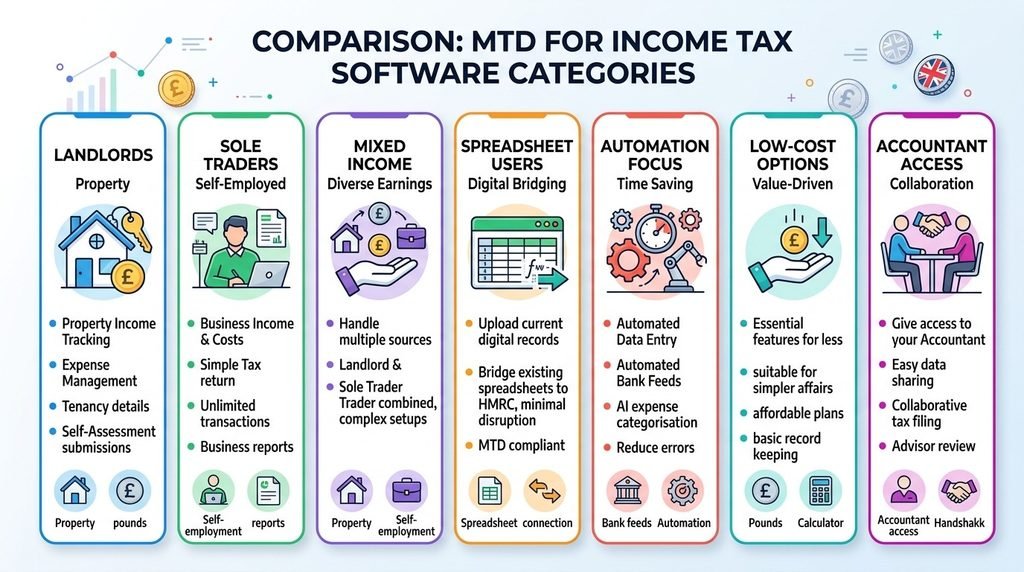
The quick answer: there isn’t one best product for everybody. Xero is particularly strong where property and self-employment income need to sit within one MTD workflow. Sage offers an unusually capable free starting point for straightforward non-VAT users. FreeAgent is attractive for landlords who want property records closely connected to their tax workflow. Coconut stands out for people determined to retain spreadsheets. QuickBooks is a practical mainstream choice for a straightforward sole trade or single-property landlord, while Landlord Studio and Hammock offer more landlord-specific workflows.
The right decision depends on what happens before you press “submit”.
Best MTD-compatible software for landlords/sole traders: comparison table
| Software | Best for | MTD for Income Tax | Landlords | Sole traders | Key strength | Current price* | Main limitation |
| Xero | Mixed property and sole-trade income | Quarterly updates and final tax return | Yes | Yes | Up to five MTD businesses in one Xero organisation | Simple £7/month excl. VAT; currently £0.70 for first 6 months | Simple is non-VAT and limited to 10 invoices |
| Sage Sole Trader | Straightforward non-VAT users wanting a low-cost start | MTD-ready; Sage markets quarterly and year-end support | Yes | Yes | Genuine free tier | Free; paid Sole Trader £7/month excl. VAT | Free tier has transaction, bank-account and invoice limits |
| FreeAgent | Unincorporated landlords wanting a tax-focused workflow | Quarterly updates and annual MTD reporting | Strong | Yes | Dedicated landlord account and accountant-friendly workflow | Landlord: £10/month or £100/year excl. VAT standard | Mixed property and self-employment require separate FreeAgent accounts |
| QuickBooks Sole Trader Plus | Sole trader or single-property non-VAT landlord | MTD for Income Tax ready | Single-property use on this plan | Yes | Familiar bookkeeping, invoicing and receipt tools | £10/month + VAT standard; current public offer £5 for 6 months | Separate QuickBooks account required for each MTD income source |
| Landlord Studio | Landlords wanting property management and tax records together | Provider states quarterly updates and final declaration | Yes | Not its main use | Property-level bookkeeping and tenancy tools | MTD Go free; Pro £15/month or £144/year | Free plan has no bank feeds and charges per MTD submission |
| Hammock | Landlords prioritising bank feeds, rent and arrears tracking | Quarterly updates and final declaration | Yes | Not general sole-trader accounting | Landlord bookkeeping plus unlimited bank feeds | Basic £8/month + VAT or £76.80/year + VAT | Property-focused rather than general business accounting |
| Coconut | Spreadsheet users and people with mixed income streams | Quarterly updates; annual submission available | Yes | Yes | Low-cost bridging plus support for multiple income sources | Bridge £49.99/year; MTD Filing £129.99/year | Annual submission costs another £49.99 on the Bridge plan |
* Software prices checked: 4 September 2026. Prices and promotional offers can change. VAT treatment is stated where it was explicit on the provider page reviewed. Landlord Studio and Coconut did not make VAT treatment sufficiently clear on the pricing pages reviewed, so check the checkout price before buying.
Who actually needs MTD software in 2026?
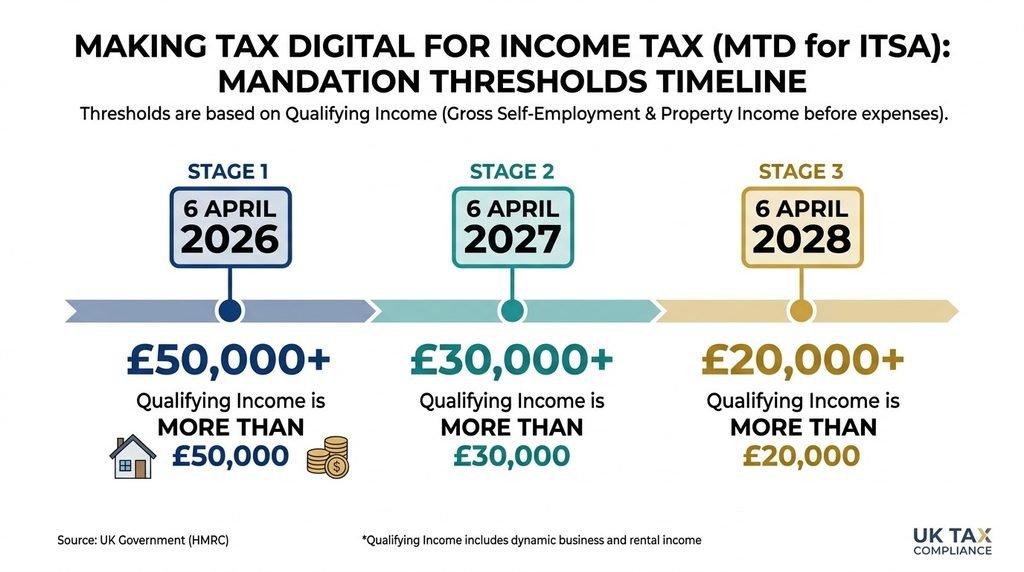
For 2026/27, MTD for Income Tax applies to qualifying sole traders and landlords whose 2024/25 qualifying income was more than £50,000. The threshold is gross qualifying income from self-employment and property before expenses and tax, not taxable profit.
HMRC’s staged timetable is:
| Self Assessment tax year used for the test | Qualifying income | MTD start date |
| 2024/25 | More than £50,000 | 6 April 2026 |
| 2025/26 | More than £30,000 | 6 April 2027 |
| 2026/27 | More than £20,000 | 6 April 2028 |
Notice the word “more”. Someone with exactly £50,000 of qualifying income does not cross a rule expressed as “more than £50,000”.
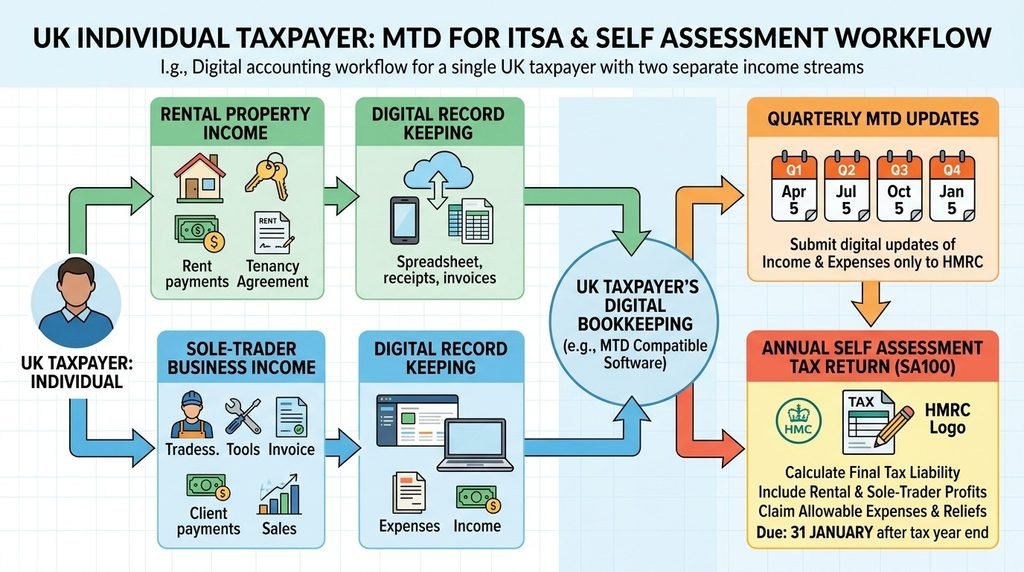
Once you are in MTD, compatible software must help create, store and correct digital records, send quarterly updates and complete the annual tax-return process. HMRC’s standard quarterly deadlines are 7 August, 7 November, 7 February and 7 May. Quarterly updates are summaries of cumulative income and expense data; they are not quarterly tax returns and do not mean Income Tax suddenly becomes payable four times a year.
For taxpayers who entered MTD on 6 April 2026, the first standard quarterly deadline, 7 August 2026, has already passed. The next is 7 November 2026.
HMRC is not applying penalty points for late quarterly updates in the 2026/27 tax year, although the updates still have to be completed before the annual tax return can be submitted. From later tax years, the MTD late-submission system has a four-point threshold, with a £200 penalty when that threshold is reached and further £200 penalties for subsequent missed deadlines while at the threshold.
For the underlying readiness question rather than the product comparison, Bloom Financials’ guide explains why owning MTD-compatible software is only one part of having records that are genuinely ready to file.
What should landlords and sole traders look for in MTD software?
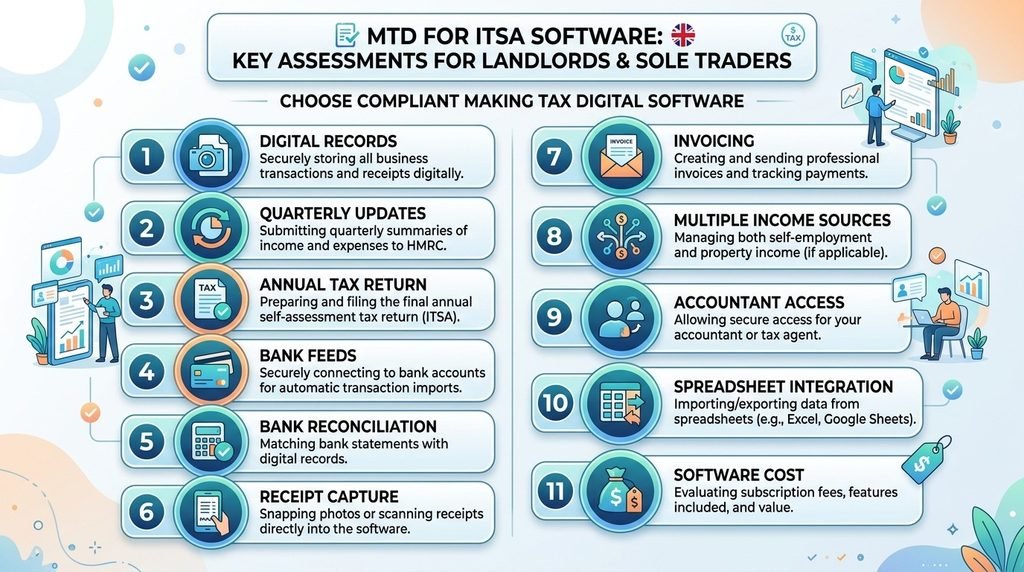
Start with the tax workflow, not the app-store screenshots.
HMRC itself tells users to think about income sources, whether they want to create new digital records or connect existing ones, their accounting period and whether an accountant or bookkeeper will be involved. HMRC also makes an important point that software buyers occasionally miss: HMRC does not recommend any individual product or provider. Products in its software finder have gone through its recognition process, but the purchasing decision remains yours.
Before subscribing, check:
- Does it support your actual income sources? A sole-trade-only package isn’t enough simply because your property records happen to be digital.
- Can it complete the whole MTD journey? Check digital records, quarterly updates and the annual tax return rather than stopping at “MTD-ready”.
- What happens if you have two activities? Some products handle multiple businesses in one subscription; others require another account and another fee.
- Can you reconcile the bank properly? Importing transactions is not the same as checking that the accounting records agree with the bank.
- How are receipts and invoices retained? Digital transaction records do not remove the need to retain supporting records such as invoices and bank statements.
- Does your accountant have suitable access? Consider permissions, audit trail, exports and who controls the subscription.
- Do you need invoicing, VAT or CIS? A cheap non-VAT plan can become the wrong plan very quickly if your circumstances change.
- Can you export the data cleanly? You may change software, accountant or business structure later.
- What happens after the introductory discount? Compare the normal annual cost, not just “90% off for six months”.
- Will the software reduce work—or simply move it? A £5 subscription that creates two hours of duplicate entry every month may be more expensive in practice than a £20 subscription.
And don’t confuse automation with accounting judgement.
A bank feed isn’t an accountant.
It can import a £600 payment. It cannot necessarily know whether that payment is rent, a deposit, a transfer between your own accounts, a capital cost, an allowable expense or something personal.
How this comparison was assessed
Bloom Financials has not supplied evidence that it personally laboratory-tested every product in this article, so this is not presented as a hands-on test.
The editorial assessment is based on current HMRC requirements plus publicly verifiable UK product documentation, feature pages and prices. The framework gives most weight to the areas that can cause the greatest practical difficulty:
- MTD functionality and filing scope — 25%
- Suitability for the target landlord/sole-trader user — 20%
- Bookkeeping and digital-record features — 15%
- Usability and workflow complexity — 10%
- Bank feeds and reconciliation — 10%
- Accountant/bookkeeper collaboration — 10%
- Pricing and value — 10%
There are deliberately no pseudo-scientific scores such as “9.7/10”. The more useful question is whether a product matches your records, income sources and working habits.
1. Xero: best overall for mixed income and a scalable accounting workflow
Best for: Someone with both property and self-employment income, or a sole trader who wants mainstream cloud accounting with room to grow.
Why it stands out: Xero’s MTD for Income Tax functionality covers quarterly updates and the final declaration, and Xero says multiple income sources and businesses can be managed within one subscription. Its current support documentation allows up to five MTD businesses in one Xero organisation.
That matters.
A landlord who also consults as a sole trader does not necessarily want two subscriptions, two sets of login credentials and a manual process for making sure both sets of records are complete at year end.
The entry-level Simple plan currently costs £7 a month excluding VAT, with a 90% introductory offer of £0.70 a month for the first six months. That makes the first 12 months £46.20 excluding VAT if the offer remains available, compared with a normal £84 annualised cost. Simple includes MTD for Income Tax, reconciliation, receipt capture and up to 10 invoices or quotes.
For a VAT-registered sole trader, Simple is not the answer. Ignite is £18 a month excluding VAT following Xero’s 1 September 2026 price change and adds VAT submissions, more invoicing and broader bookkeeping functionality.
Watch out for: Xero is accounting software rather than property-management software. A portfolio landlord wanting tenancy management, arrears monitoring and property-specific operational metrics may prefer a specialist landlord platform or an integration alongside Xero.
Check Xero’s current UK plans and pricing
2. FreeAgent: best dedicated accounting-and-tax workflow for many landlords
Best for: An unincorporated landlord who wants property bookkeeping, MTD reporting and accountant collaboration within a tax-focused accounting platform.
Why it stands out: FreeAgent has a specific unincorporated-landlord account rather than forcing rental activity into a generic trade template. One landlord account can cover a property portfolio, including situations involving multiple owners, subject to FreeAgent’s account setup requirements.
The standard landlord price is £10 a month excluding VAT or £100 a year excluding VAT. At the time checked, FreeAgent offered 50% off the first six months or first annual subscription, taking the first annual landlord plan to £50 excluding VAT. A 30-day free trial is available.
Its standard sole-trader pricing is higher: £19 a month or £190 a year excluding VAT before promotions.
FreeAgent also supports bank transactions, invoices, expenses and MTD reporting. For users processing substantial receipt volumes, however, note that unlimited Smart Capture is a separate £5 a month excluding VAT add-on.
Here’s the catch for mixed-income taxpayers.
If you’re both self-employed and a landlord, FreeAgent requires a separate sole-trader account and an unincorporated-landlord account. Multiple sole trades need separate accounts too. That can change both the cost and the amount of administration.
FreeAgent also says it is still examining foreign-property reporting support for 2026/27, so don’t assume it covers foreign-property MTD requirements without checking your circumstances first.
Watch out for: Excellent fit for a landlord-only portfolio does not automatically make it the lowest-cost choice for someone with several distinct MTD income sources.
See FreeAgent’s current pricing
3. Coconut: best MTD bridging option for spreadsheet users
Best for: A landlord or sole trader whose spreadsheet already works and who does not want to rebuild the entire bookkeeping system simply because MTD has arrived.
Why it stands out: HMRC expressly allows spreadsheets to remain part of an MTD workflow if suitable software connects those records digitally to the submission process. You do not have to abandon a well-designed spreadsheet simply because it isn’t a full cloud ledger.
Coconut makes that approach unusually clear.
Its MTD Bridging plan costs £49.99 a year, supports self-employment and property income and can deal with multiple businesses and income sources. It lets a user upload spreadsheet records and submit quarterly MTD updates. If you also want Coconut to handle the MTD Annual Submission on that plan, the provider currently charges another £49.99. Total potential annual filing cost: £99.98, before considering VAT if applicable.
The fuller MTD Filing plan costs £12.99 a month or £129.99 a year and includes the annual MTD submission, bank transaction imports, categorisation, receipt storage, invoicing, accountant invitations and support for multiple income streams. Paying £12.99 monthly for 12 months works out at £155.88, so the annual plan saves £25.89 at today’s prices.
Watch out for: Bridging software solves the connection and submission problem. It does not magically clean the spreadsheet.
If columns are inconsistent, expenses are in the wrong categories or transactions have been omitted, a successful upload can still carry poor bookkeeping into the MTD process. HMRC also requires digital links where more than one software product is involved; after a digital record has entered the relevant system, manually copying or re-keying records between products is not an acceptable substitute for those links.
See Coconut’s current MTD plans
4. Sage Sole Trader: best free starting point for simple non-VAT affairs
Best for: A straightforward sole trader or landlord who wants to start digital record keeping without immediately taking on another monthly subscription.
Why it stands out: Sage Sole Trader Free costs £0 and currently includes one bank account, up to 25 auto-categorised transactions, manual receipt recording, five sales invoices per month, mobile access and the ability to record landlord income and expenses. Sage markets the product as MTD-ready for both sole traders and landlords.
That makes it worth looking at before assuming MTD necessarily means a £100–£300 annual software bill.
The paid Sage Sole Trader plan has a normal price of £7 a month excluding VAT and adds unlimited auto-categorised transactions, receipt scanning, multiple bank accounts, 10GB of document storage, unlimited invoices and human webchat support. Sage was advertising 90% off for the first six months when checked.
For VAT-registered sole traders, Sage directs users towards its broader Accounting product rather than Sole Trader. Its entry-level Accounting “Start” package is currently £20 a month excluding VAT at standard price.
Watch out for: Free software is only good value while its limits match your actual workload. Twenty-five auto-categorised transactions and one connected bank account may be ample for a low-volume landlord and restrictive for a busy trader.
See Sage’s current sole-trader options
5. QuickBooks Sole Trader Plus: best for a straightforward sole trade or single-property landlord
Best for: A non-VAT sole trader or a landlord with one property who wants mainstream bookkeeping, invoicing, receipt capture and MTD in a familiar package.
Why it stands out: QuickBooks positions Sole Trader Plus specifically for sole traders and single-property owner landlords who are not VAT registered. The plan provides one user plus accountant access, receipt capture, mileage tracking and MTD for Income Tax functionality.
The normal price is £10 a month plus 20% VAT. The public UK offer checked on 4 September 2026 was £5 a month for the first six months, then £10, which produces a first-year software cost of £90 plus VAT if maintained for 12 months.
VAT-registered users need a broader plan such as Simple Start rather than Sole Trader Plus.
QuickBooks’ current MTD help also makes an important limitation explicit: each QuickBooks account connects to one primary MTD income source. If you have a sole trade and rental income, QuickBooks’ guidance says separate accounts are needed for the separate business sources. It also states that foreign-property businesses are not currently supported for MTD for Income Tax.
Watch out for: The £10 headline price becomes less persuasive if your affairs require two subscriptions. A landlord with several properties or mixed income should confirm the intended structure before moving records.
6. Landlord Studio: best for combining property management with MTD bookkeeping
Best for: A landlord who wants rent, expenses, tenancy administration and MTD records in the same property-specific system.
Why it stands out: Landlord Studio is built around properties rather than around a generic chart of accounts.
Its MTD Go plan is free for one to three units and includes manual income and expense tracking, mileage, document storage and basic reporting. MTD submissions cost £5 per submission on that tier. It does not include bank feeds.
The Pro plan moves into a more automated workflow with bank feeds, AI-assisted bookkeeping, bank rules, receipt scanning, advanced reports, multiple users and MTD submissions included. The pricing page currently shows £15 a month on monthly billing or the equivalent of £12 a month when billed annually — £144 a year. Three units are included, with an additional-unit price shown as £1.20.
Landlord Studio’s current MTD documentation says quarterly updates and the final declaration can be submitted directly through its MTD functionality.
Watch out for: The free tier sounds attractive until you compare the workflow. No bank feeds means more manual upkeep, while per-submission charges need to be considered alongside the free subscription. Also confirm the final checkout price and VAT treatment, as VAT treatment was not clearly displayed on the pricing page reviewed.
7. Hammock: best for landlord bank-feed, rent and arrears automation
Best for: A landlord who values property-specific bookkeeping and wants rental cash movements visible throughout the year.
Why it stands out: Hammock’s plans combine MTD functionality with rent tracking, arrears tracking, bookkeeping, property and tenancy information and unlimited bank feeds.
The Basic plan covers one to three properties and currently costs £8 a month plus VAT or £76.80 a year plus VAT on annual billing. Standard, covering four to ten properties, is £15 a month plus VAT or £144 annually plus VAT. Hammock lists both quarterly MTD filing and the final declaration among its plan features.
That property focus may be more useful than another 20 general accounting reports if your real monthly job is checking that rent arrived, allocating expenditure to the right property and keeping evidence attached to the transaction.
Watch out for: Hammock is a landlord product. Someone who also operates a substantial sole trade needs to consider how that business activity will be recorded and submitted rather than assuming the property system replaces general business accounting.
Best MTD software for landlords specifically
The strongest choice depends on what “landlord software” means to you.
If your priority is tax and accounting workflow, FreeAgent is compelling. Its dedicated unincorporated-landlord account avoids treating property as though it were simply another sales business.
If your priority is running the properties themselves, Landlord Studio and Hammock deserve closer attention. They understand property-level expenses, tenancies, rent and portfolio administration in a way general accounting platforms usually do not.
For a one-property landlord with relatively few transactions, Sage Sole Trader Free may be enough to start with, while QuickBooks Sole Trader Plus offers a more conventional bookkeeping and invoicing environment.
For a landlord who also has self-employment income, Xero moves up the list because it can connect up to five MTD businesses within one organisation. Coconut is also attractive if the priority is retaining a spreadsheet-based workflow.
Best MTD software for sole traders specifically
A straightforward non-VAT sole trader should look first at Sage Sole Trader Free, Xero Simple and QuickBooks Sole Trader Plus.
Sage wins on entry price.
Xero is particularly attractive when the business may become more complicated or where another MTD income source already exists.
QuickBooks makes sense for somebody who wants familiar small-business features such as invoicing, expense management and receipt capture and has a single primary MTD business source.
For higher invoice volumes or VAT registration, compare the next appropriate tier rather than trying to force a basic non-VAT package to do a job it was not designed to do. Xero Ignite, for example, supports VAT and 20 invoices compared with Simple’s 10; Sage moves VAT-registered users towards Sage Accounting.
Full accounting software or MTD bridging software?
Use full accounting software when you want the software to become the main bookkeeping record. Use bridging software when your existing spreadsheet or accounting system already works and you mainly need a compliant digital route into HMRC.
HMRC explicitly allows both approaches. Compatible software may create the digital records itself or connect to records held elsewhere, such as a spreadsheet.
Bridging can therefore make sense where:
- the spreadsheet is already well designed;
- transactions are kept up to date;
- categories map correctly to MTD requirements;
- you have a reliable review/reconciliation process; and
- the spreadsheet is digitally linked to the submission software.
What does not work is a “digital” process that depends on repeatedly copying numbers by hand between systems. HMRC’s current guidance specifically prohibits cut-and-paste or copy-and-paste as a substitute for the required digital links once the relevant digital record is in the MTD chain. CSV imports, linked spreadsheet cells, APIs and other digital transfers can be acceptable.
How much does MTD-compatible software really cost?
The subscription is only the most visible part of the bill.
| Example | Standard annual software cost |
| Xero Simple | £84 excl. VAT |
| Sage Sole Trader paid | £84 excl. VAT |
| FreeAgent landlord, annual billing | £100 excl. VAT |
| FreeAgent sole trader, annual billing | £190 excl. VAT |
| QuickBooks Sole Trader Plus | £120 + VAT |
| Landlord Studio Pro, annual billing | £144; VAT treatment should be confirmed |
| Hammock Basic, annual billing | £76.80 + VAT |
| Coconut MTD Filing, annual billing | £129.99; VAT treatment should be confirmed |
| Coconut Bridge + annual MTD submission | £99.98; VAT treatment should be confirmed |
Those figures still don’t show the whole economic cost.
You may also pay for:
- a higher software tier because of VAT or invoice limits;
- extra receipt-capture capacity;
- additional businesses or accounts;
- payroll or CIS features;
- an accountant or bookkeeper;
- initial data migration;
- cleanup of opening balances and historic transactions;
- implementation and training;
- integrations; and
- time spent on duplicated manual work.
Take two fictional packages costing £12 and £20 a month. The difference is £96 a year.
If the £20 product saves only 15 minutes of avoidable manual work each week, that is roughly 13 hours over a year. The more expensive subscription may have the lower overall workflow cost before you even put a value on those hours.
On paper, the cheaper plan looks attractive.
This is where things can get expensive.
Which option should you choose?
| Your situation | Options worth shortlisting | Why |
| One-property landlord, few transactions | Sage Free, QuickBooks Sole Trader Plus, Landlord Studio Go | Avoid paying for portfolio-scale functionality you will not use |
| Landlord with several properties | FreeAgent, Landlord Studio, Hammock | Dedicated property workflows become more valuable |
| Straightforward non-VAT sole trader | Sage Sole Trader, Xero Simple, QuickBooks Sole Trader Plus | Low-cost bookkeeping and MTD features without excessive complexity |
| Sole trader issuing many invoices | Sage paid plan, Xero Ignite or suitable QuickBooks tier | Entry plans can impose invoice or transaction limits |
| Property plus self-employment income | Xero or Coconut | Both offer practical routes for multiple income sources; Xero can connect up to five MTD businesses in one organisation |
| Existing spreadsheet user | Coconut MTD Bridging | Keeps the record-keeping method while adding the MTD submission layer |
| Already working with an accountant | Ask the accountant before changing | HMRC itself recommends discussing software choice with your agent |
| Lowest possible software spend | Sage Free; Coconut Bridge where spreadsheet is suitable | Low headline price without automatically forcing a full ledger migration |
| Landlord prioritising automation | Hammock or Landlord Studio Pro | Bank feeds and property-specific workflows can remove repetitive handling |
The key word is shortlisting.
Your accountant’s systems matter. Your VAT position matters. Your number of businesses matters. The quality of your existing data matters.
HMRC’s software finder specifically advises taxpayers with a main or supporting agent to ask that agent about software choice so that the products can work together.
Can your accountant manage MTD through your software?
Yes. A properly authorised tax agent can manage some or all MTD for Income Tax work on your behalf.
HMRC now distinguishes between main agents and supporting agents. A bookkeeper might act as a supporting agent and deal with quarterly updates, while a main agent can finalise the overall tax position and submit the tax return. You can have one main agent and multiple supporting agents for MTD for Income Tax.
That makes accountant access more than a convenience feature.
Before buying software, establish:
- who will maintain day-to-day digital records;
- who will reconcile the bank;
- who will correct categorisation errors;
- who will review quarterly totals;
- who presses submit;
- who handles year-end adjustments;
- and which software will submit the annual return.
If your accountant already has an efficient Xero, Sage, QuickBooks, FreeAgent or other recognised practice workflow, switching to an unrelated system to save £4 a month can be false economy.
Mistakes to avoid when choosing MTD software
1. Buying on the introductory price alone.
A six-month discount is useful. Your bookkeeping system may remain in place for years.
2. Assuming “digital” means MTD-ready.
A spreadsheet stored on Google Drive is digital. That does not mean it can meet HMRC’s submission and digital-link requirements by itself.
3. Checking quarterly updates but forgetting the annual tax return.
HMRC requires the MTD software arrangement to cover the annual return as well as quarterly reporting.
4. Treating a bank feed as reconciliation.
Imported transactions still need to be matched, reviewed and correctly categorised.
5. Ignoring mixed income.
Two products with the same monthly price can produce very different costs if one handles property plus a trade in one organisation and the other requires separate subscriptions.
6. Assuming receipt capture means the accounting treatment is correct.
Optical recognition can read an amount and supplier. It cannot make every tax judgement for you.
7. Changing software immediately before a deadline.
HMRC allows software changes during the tax year, but current-year digital records need to be imported or recreated appropriately, while bridging arrangements need their links changed correctly.
8. Ignoring exit routes.
Check whether you can export transactions, reports and supporting data if you later change accountant or platform.
Software alone does not make your records MTD-ready
Software is the tool. Accurate bookkeeping and a functioning MTD workflow are the system.
Suppose the bank feed contains 240 transactions and 37 are uncategorised. Six payments from a personal account are missing. Two mortgage payments have been posted wholly as property expenses without review. Rental deposits have been mixed with rent. Three invoices appear twice because they were entered manually and then imported through the bank.
The software can still be technically compatible with HMRC.
The records are still poor.
That is why the ongoing process matters: transaction recording, evidence retention, appropriate coding, regular bank reconciliation, correction of errors and review before submission.
Bloom Financials’ bookkeeping service includes transaction recording and reconciliation support, while its cloud accountancy design and tax implementation service covers areas such as cloud-system design, migration, integration and process automation. Its wider accounting services can then connect those records with the broader accounting process.
The objective should not be “install MTD software”.
It should be “build a record-keeping process that is accurate enough to make each MTD deadline routine”.
How Bloom Financials can help
If you’re deciding between keeping existing software, moving to a new cloud accounting platform or retaining spreadsheets with bridging software, it can be useful to review the workflow before committing the records to another system.
Bloom Financials can support areas including bookkeeping, bank reconciliation, cloud-accountancy implementation, Self Assessment and HMRC compliance support, based on the services currently described on its website.
That may be particularly relevant where:
- property and sole-trade income need to be coordinated;
- existing records require cleaning before migration;
- several months of transactions remain unreconciled;
- software needs to work with an accountant or bookkeeper;
- the first 2026/27 MTD update was missed;
- a spreadsheet workflow needs compliant bridging; or
- you want to understand the ongoing cost before buying another subscription.
If you’re at the software-selection stage, you can book a free 30-minute consultation with Bloom Financials to discuss the current accounting workflow and the practical next step.
Frequently asked questions
What software do landlords need for Making Tax Digital?
Landlords within MTD for Income Tax need commercial software that works with MTD and can form part of a process for digital records, quarterly updates and the annual tax return. This can be full landlord/accounting software or, where appropriate, a spreadsheet connected through bridging software. Use HMRC’s software finder to check the exact income sources and features you need.
What is the best MTD software for a sole trader?
For a straightforward non-VAT sole trader, Sage Sole Trader Free, Xero Simple and QuickBooks Sole Trader Plus are sensible starting points. Sage has the lowest entry cost; Xero is particularly useful where more than one MTD business needs to be coordinated; QuickBooks suits a conventional single-business bookkeeping workflow. The best choice depends on transaction volume, invoicing, VAT status and accountant involvement.
Can landlords use Excel for Making Tax Digital?
Yes, but Excel cannot normally be the entire MTD process on its own. HMRC says spreadsheets can continue to hold digital records if software links those records to the MTD submission process. Where several products are used, the records must be digitally linked; manual copy-and-paste is not a substitute for the required digital connection.
Does HMRC provide free MTD software?
No. HMRC does not provide the software itself. Commercial providers offer both paid and free products, and HMRC notes that free products may have limits such as restricted transaction numbers. Sage Sole Trader Free is one current example of a £0 product, although users should check that its limits and functionality fit their circumstances.
Can my accountant submit MTD updates for me?
Yes, provided the appropriate HMRC authorisation is in place. A supporting agent may handle tasks such as quarterly updates, while a main agent has broader authority and can submit the final tax return. This makes it sensible to agree responsibilities with your accountant before choosing or changing software.
Do I need separate software for rental income and sole-trade income?
Not necessarily. HMRC allows more than one business or income source to form part of the MTD process, but individual products handle them differently. Xero can connect up to five MTD businesses in one organisation. FreeAgent requires separate landlord and sole-trader accounts, and QuickBooks says separate accounts are needed for each business income source.
Does Making Tax Digital mean I have to pay Income Tax quarterly?
No. Quarterly updates are reporting summaries, not quarterly Income Tax bills. For standard update periods they are due on 7 August, 7 November, 7 February and 7 May. HMRC’s normal deadline for the final tax return and tax due remains 31 January following the tax year, subject to the taxpayer’s circumstances and normal payment rules.
What happens if my income is below the MTD threshold?
If your qualifying income does not exceed the applicable threshold, you are not required to enter MTD under that stage solely because you are a landlord or sole trader. HMRC currently brings taxpayers in according to the previous relevant tax return: more than £50,000 for April 2026, more than £30,000 for April 2027 and more than £20,000 for April 2028. Exemptions can also apply in particular circumstances.
Can I change MTD accounting software during the tax year?
Yes, but plan the migration carefully. HMRC says that when changing record-keeping software during a tax year, current-year digital records need to be imported into the new product or recreated there as required. If changing bridging software, the new bridge needs to be linked to the record-keeping software and the old link removed.
Bottom line
The best product is not automatically the one with the most features—or the smallest monthly number.
For a simple non-VAT sole trader, Sage’s free tier deserves serious consideration before paying for functionality you don’t need.
For a person with property and self-employment income, Xero is particularly strong because several MTD businesses can be connected within one organisation.
For an unincorporated landlord who wants accounting and tax closely connected, FreeAgent is a strong specialist option.
For landlord property management as well as MTD, compare Landlord Studio and Hammock.
For a straightforward sole trader or single-property landlord, QuickBooks Sole Trader Plus provides a familiar small-business workflow.
And if your spreadsheet is already tidy, reconciled and understood, Coconut’s bridging plan may be more rational than replacing the entire bookkeeping process.
The cheapest software isn’t automatically the cheapest workflow.
Before subscribing, work out three things: what HMRC requires from you, what your records look like today, and who will actually maintain and review them throughout the year.