
You open your accounting software and everything looks reassuring enough. The bank account is connected. Sales invoices are there. A dashboard shows a healthy balance.
Then you click into the transactions.
Three months are still unreconciled. Several payments are sitting under “uncategorised”. A transfer from your personal account appears to have been treated as sales income. Your rental-property figures live in another spreadsheet that nobody has touched since April.
That is the awkward truth about Making Tax Digital: having digital tools and having MTD-ready records are not the same thing.
So, is my business ready for making tax digital? The answer depends on two separate questions: whether HMRC requires you to use MTD for Income Tax and whether your bookkeeping process can actually support the new reporting rhythm.
Is my business ready for Making Tax Digital?
Your business is likely to be MTD-ready if you know whether your qualifying income puts you in scope, maintain accurate digital records, use compatible software, reconcile transactions regularly and have a clear process for quarterly updates and the annual tax return. Simply buying accounting software or connecting a bank feed is not enough.
The quick MTD readiness test
Work through this before worrying about software brands or HMRC submissions.
- I know which Self Assessment tax return HMRC uses to assess when I enter MTD.
- I have calculated my qualifying gross self-employment and property income rather than looking only at profit.
- My relevant accounting records are kept digitally.
- My software currently works with MTD for Income Tax, or my existing records connect digitally to compatible software.
- My business-bank transactions are reconciled regularly.
- Income and expenses are correctly categorised.
- I can distinguish business spending, personal spending and transfers.
- My invoices, receipts and other supporting evidence can be traced to the accounting records.
- Separate businesses or income sources are organised correctly.
- I know who will review and send each quarterly update.
- I understand that the annual tax return has not disappeared.
- I have checked whether an exemption might apply.
This is not an official HMRC score. Treat it as a diagnostic.
If one or two operational boxes are missing, you may need relatively modest preparation. If you cannot answer the first four, establish your MTD position before doing anything else.
Who needs Making Tax Digital for Income Tax now?
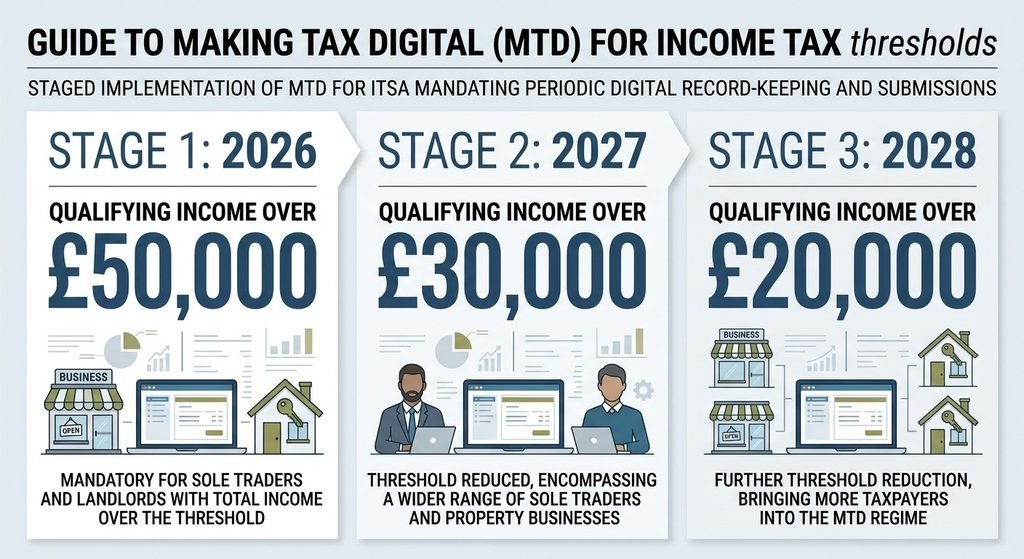
As at 24 August 2026, MTD for Income Tax already applies to certain sole traders and landlords whose qualifying income for 2024/25 was more than £50,000. HMRC is bringing further taxpayers into the system in stages.
| Self Assessment tax year used for the test | Qualifying income | MTD for Income Tax start date |
| 2024/25 | More than £50,000 | 6 April 2026 |
| 2025/26 | More than £30,000 | 6 April 2027 |
| 2026/27 | More than £20,000 | 6 April 2028 |
Notice the wording “more than”. The threshold is not “£50,000 or more”.
HMRC reviews the relevant Self Assessment return, but responsibility does not disappear if you do not receive a letter. HMRC explicitly tells taxpayers to check their qualifying income themselves.
If you should have entered MTD on 6 April 2026 and have not signed up, HMRC’s current guidance says you should sign up now. From September 2026, HMRC also plans to begin automatically signing up in stages some people it believes should already be using the system.
Bloom Financials has also published an explanation of the August 2026 development in its HMRC automatic MTD sign-up guidance.
What does HMRC mean by qualifying income?
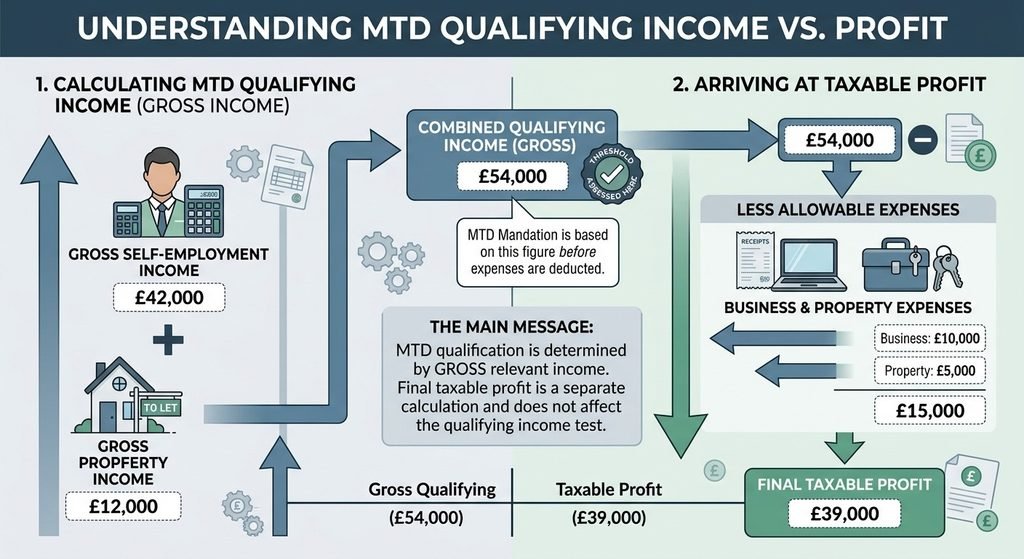
Qualifying income is broadly your gross income from self-employment and property before expenses, based on the relevant Self Assessment return. More than one qualifying source can be combined.
That distinction matters because turnover and profit answer different questions.
Imagine an illustrative sole trader with:
- £42,000 gross self-employment income; and
- £12,000 gross property income.
Their combined qualifying income is £54,000.
Perhaps business expenses, property costs and other allowable deductions eventually reduce taxable profit substantially. That does not turn £54,000 of qualifying gross income into £35,000 for the MTD threshold test.
HMRC itself gives a similar principle: £25,000 of rental income plus £27,000 of self-employment income produces £52,000 of qualifying income.
Does PAYE income count towards the MTD threshold?
No. Employment income taxed through PAYE does not count as qualifying income for the MTD for Income Tax threshold.
Do dividends count?
No. Dividends, including dividends from your own limited company, do not count towards qualifying income. They may still need to appear in the annual tax return.
Does rental income count?
Yes, property income can count. For a UK tax resident, qualifying income can include UK and foreign property income as well as self-employment income. There are additional rules for situations such as jointly owned property and non-UK residence.
Does MTD apply to my type of business?
Sole traders
A sole trader can be required to use MTD for Income Tax where the relevant qualifying income exceeds the applicable threshold.
If you have more than one sole-trade business, HMRC requires separate digital records and separate quarterly updates for each source of self-employment income.
Landlords
Landlords are within the regime where qualifying property income puts them over the threshold, either on its own or together with self-employment income.
This is an easy area to misjudge because a landlord may mentally focus on rental profit after mortgage costs, agent fees and repairs. HMRC’s qualifying-income test begins with gross qualifying income rather than that final profit figure.
Freelancers and contractors
If you trade personally as a sole trader, your freelance or contracting turnover can be qualifying self-employment income.
Bloom Financials’ existing MTD guide for contractors and limited-company directors provides additional sector-specific context.
Limited-company directors
Being a director does not, by itself, put a limited company into MTD for Income Tax.
Salary under PAYE, dividends and income retained within a limited company are not treated as the director’s qualifying self-employment/property income for this MTD test.
A director could still be personally affected, though. For example, someone who draws salary and dividends from a company but personally owns a substantial rental property portfolio may enter MTD because of the property income.
That distinction is important: the individual’s personal qualifying income and the limited company’s income are not interchangeable.
People with partnership income
Partnerships do not currently have to use MTD for Income Tax; HMRC says a future timetable will be announced. An individual’s share of partnership profit also does not count towards their qualifying income for the current individual MTD threshold.
People with both property and self-employment income
This is one of the biggest traps.
A person might have £29,000 of self-employed turnover and £24,000 of rental income. Neither number looks especially close to £50,000 in isolation. Together they produce £53,000 of qualifying income.
Always examine the relevant qualifying sources together.
The mistake: thinking software automatically makes you MTD-ready
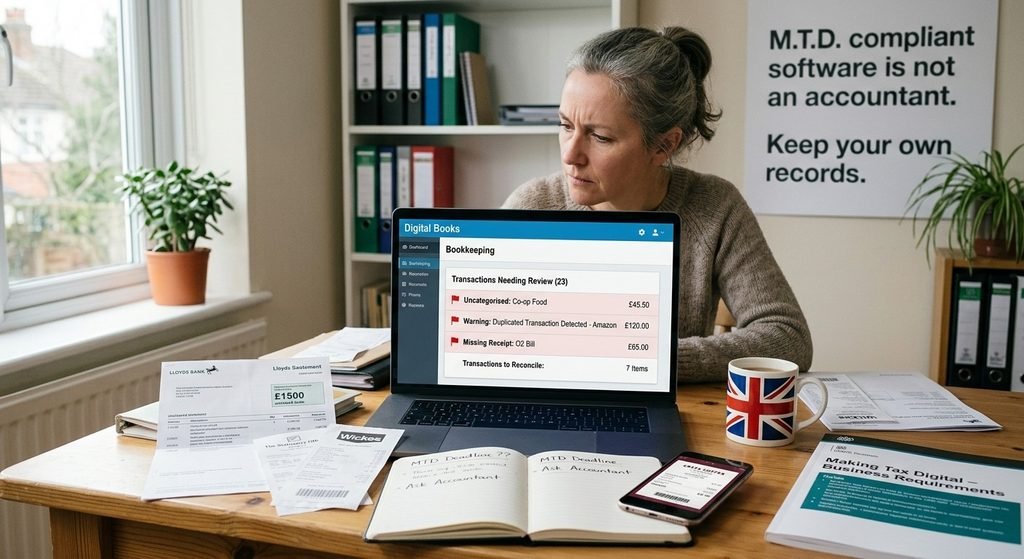
Buying compatible software is a compliance component. It is not a bookkeeping clean-up service.
A business can have the right software and still have:
- six weeks of unreconciled bank transactions;
- duplicate sales created by both a bank feed and manual entries;
- missing invoices;
- card payments with no supporting evidence;
- personal spending coded as a business expense;
- transfers incorrectly treated as income;
- inconsistent VAT treatment;
- several spreadsheets containing overlapping records;
- incorrect opening balances; or
- books that are updated only when a deadline approaches.
HMRC’s own guidance illustrates why the distinction matters. Where software imports bank transactions, taxpayers may still need to add information such as the appropriate Self Assessment category, and some items may not appear fully in the bank feed at all. HMRC says the taxpayer remains responsible for checking that digital records are accurate.
A bank feed is a useful pipe for data.
It is not an accountant.
Bloom Financials’ bookkeeping service includes transaction recording and bank reconciliation — exactly the sort of underlying work that makes the digital reporting process dependable.
Can I still use spreadsheets for Making Tax Digital?
Yes, potentially.
HMRC allows software that connects to existing records such as spreadsheets. This is often called bridging software. If you use more than one product, however, the relevant record-keeping and submission software needs to be digitally linked in the way required by HMRC.
So the useful question is not:
“Does HMRC ban Excel?”
It is:
“Does my spreadsheet form part of a functioning digital MTD workflow?”
A spreadsheet may be perfectly manageable for a simple sole trade with a modest number of transactions and disciplined record keeping.
It becomes less attractive when you have:
- several bank accounts;
- multiple businesses;
- property and trading income;
- hundreds of monthly transactions;
- complicated VAT treatment;
- repeated manual copying between files; or
- nobody routinely checking whether the figures reconcile.
If your system has outgrown its spreadsheet, Bloom Financials’ cloud accountancy design and implementation service may be a relevant internal next step.
Seven signs your bookkeeping is not MTD-ready
1. You update the accounts only once a year
MTD introduces an in-year reporting rhythm. Waiting until January to sort last April’s transactions is no longer a sensible operational model for somebody submitting quarterly updates.
2. Your bank balance and accounting balance do not reconcile
Bank reconciliation checks whether transactions in the bookkeeping records can be matched to the real bank account.
A persistent difference may point to missing entries, duplication, date problems or incorrect opening balances.
3. You have a large “uncategorised” balance
Imported data is not finished bookkeeping. Transactions still need the correct accounting treatment.
4. Personal and business transactions are mixed together
A sole trader can legally use an account that also contains personal spending, but it creates additional bookkeeping work and increases the chance of misclassification.
5. You cannot trace figures back to evidence
HMRC requires digital records for the MTD process, while normal Self Assessment record-retention obligations continue. Supporting material such as invoices and bank statements therefore still matters.
6. Your spreadsheet and submission software are disconnected
A spreadsheet can be part of an MTD system. A collection of unrelated files that requires figures to be repeatedly reconstructed is a different matter.
7. Nobody knows who owns the process
Who enters the transactions?
Who checks doubtful categories?
Who chases missing invoices?
Who deals with corrections?
Who submits the update?
Who covers the work if that person is away?
MTD readiness is partly an accounting issue and partly an operating-process issue.
What an MTD-ready accounting system actually looks like
A useful way to test your process is to follow one ordinary transaction from beginning to end:
Transaction → digital record → supporting evidence → categorisation → reconciliation → review → quarterly update → year-end adjustments → tax return
Transaction
Something economically happens: you make a sale, receive rent, buy materials or pay a relevant expense.
Digital record
The income or expense is recorded in the MTD record-keeping system.
Supporting evidence
The invoice, receipt, bank statement or other record supports what has been entered.
Categorisation
The transaction goes to an appropriate income or expense category rather than sitting indefinitely under “other” or “uncategorised”.
Reconciliation
The bookkeeping records are checked against bank accounts and other relevant control information.
Review
Errors, duplicates and unusual items are corrected before they become part of a wider reporting problem.
Quarterly update
Compatible software submits the required summary to HMRC.
For 2026/27, HMRC’s quarterly updates are cumulative: each update covers from the start of the tax year to the end of that update period. This also means later corrections can flow into the next cumulative update rather than automatically requiring every earlier update to be resubmitted.
Year-end adjustments
The annual process is still where the full tax position is finalised, including appropriate adjustments, reliefs and other information.
Tax return
You then submit the annual tax return using MTD-compatible software. MTD has changed the process; it has not abolished the tax return.
A realistic example: before and after MTD readiness
Consider Imran, a fictional electrician in Birmingham.
He has:
- £58,000 annual sole-trade turnover;
- around 170 bank and card transactions each month;
- one business current account;
- a spreadsheet updated every six to eight weeks; and
- receipts split between email, a van glovebox and photographs on his phone.
The spreadsheet tells him roughly whether he is making money. It is not completely useless.
But it creates four problems.
First, nobody performs a formal monthly bank reconciliation.
Second, payments to builders’ merchants often appear in the spreadsheet without invoices.
Third, personal fuel purchases occasionally enter the business records.
Fourth, his accountant receives the whole year’s information after Christmas.
Before
The process is:
Bank statement → occasional spreadsheet update → January clean-up → tax return
After an MTD-readiness project
The process becomes:
Bank feed → weekly review → digital receipt capture → correct coding → monthly reconciliation → accountant review → quarterly update → annual adjustments → tax return
The important change is not the logo on the software.
It is that Imran’s records become current enough to check and structured enough to trust.
How much preparation might my business need?
Low preparation
You already:
- keep digital records;
- reconcile accounts regularly;
- use suitable compatible software;
- capture supporting documents as you go; and
- have clear responsibility for submissions.
Your work may mainly involve confirming the MTD connection, scope and timetable.
Medium preparation
Your records are digital but there are weaknesses:
- several months need reconciliation;
- expense categories require review;
- a spreadsheet needs bridging software;
- property records need separating from another activity; or
- nobody has documented the quarterly process.
The priority is clean-up and workflow design.
High preparation
You still rely primarily on paper records, perform bookkeeping only at year end, mix several income sources in one informal spreadsheet or cannot reconcile your accounts.
Here, buying software is the beginning rather than the end of the project.
What if I should already be using MTD and missed the first quarterly deadline?
For taxpayers required to use MTD from 6 April 2026, the first standard quarterly update deadline was 7 August 2026. As this article is reviewed on 24 August 2026, that date has passed.
Do not assume that means you should ignore the first update.
HMRC says there are no penalty points for late quarterly updates for the 2026/27 tax year, but the outstanding updates still need to be sent before you can submit the annual tax return.
A practical response is:
- confirm that you were actually required to use MTD from 6 April 2026;
- make sure you are signed up;
- authorise compatible software;
- create any digital records needed from the start of the relevant period;
- correct obvious bookkeeping gaps;
- send the outstanding update; and
- put the next deadline into a managed process rather than waiting for another catch-up exercise.
HMRC says that if somebody signs up partway through a tax year, they may need to catch up their digital record keeping from the start of the tax year.
What happens if I am not ready?
The most immediate problem is often not a penalty. It is administrative compression.
If three months of records have not been maintained properly, somebody has to reconstruct them. That could mean:
- locating missing invoices;
- separating personal from business expenditure;
- correcting duplicates;
- reconciling bank transactions;
- rebuilding property records;
- investigating unexplained transfers;
- checking whether digital links work; and
- deciding how corrected records should flow into the next update.
Repeated missed obligations can later have direct penalty consequences.
For mandatory MTD users, HMRC says quarterly-update penalty points do not apply in 2026/27. For later tax years, missing a quarterly deadline can produce a penalty point; reaching four points produces a £200 penalty, followed by a further £200 penalty for each additional missed submission while at the threshold. Separate rules apply to late annual returns and late tax payments.
This is a reason to fix the process, not a reason to panic.
Does Making Tax Digital mean I pay tax every quarter?
No.
The quarterly updates are reporting obligations, not four new Income Tax payment dates.
HMRC states that MTD for Income Tax does not change how you pay Income Tax or the dates on which payments are due. The annual tax return remains due by 31 January following the relevant tax year, and the ordinary Self Assessment payment system continues to apply.
Quarterly information may nevertheless have a cash-flow benefit: software can provide an estimated tax position after updates, giving you earlier information about what may be building up.
An estimate is useful for planning. It is not the final tax bill.
Can my accountant manage Making Tax Digital for me?
Yes, an authorised agent can handle significant parts of the MTD process. HMRC permits agents to sign clients up and to deal with digital record keeping and submissions where the appropriate arrangements and authorisations are in place.
But outsourcing MTD does not mean the business owner stops participating.
Your accountant still needs timely, complete information.
If you keep a separate sales system, use a personal card for occasional business purchases or receive rental payments into a bank account the accountant cannot see, those gaps must enter the accounting process somehow.
A good division of responsibility might look like this:
| Business owner | Accountant/bookkeeper |
| Issue invoices and identify income | Review accounting treatment |
| Upload receipts promptly | Reconcile records |
| Explain unusual transactions | Correct coding and bookkeeping errors |
| Notify new income sources | Monitor MTD workflow |
| Approve information where required | Prepare/send updates within agreed service |
| Provide year-end information | Complete tax adjustments and annual return |
The precise split depends on the engagement.
How Bloom Financials can help you become MTD-ready
The useful starting point is not “Which software should we sell you?”
It is “Where is your accounting process currently breaking down?”
Problem: you do not know whether you are in scope
Bloom Financials can review the relevant income sources and Self Assessment information as part of wider accounting and HMRC-compliance support.
Problem: your records exist, but they are messy
Bookkeeping and reconciliation can help identify missing, duplicated or incorrectly categorised transactions before they feed into submissions.
Problem: your spreadsheet needs a better digital workflow
Cloud-accountancy support can help move from disconnected files towards a system in which digital records, banking information and reporting work together.
Problem: MTD is becoming disconnected from your annual tax work
The quarterly updates and the eventual Self Assessment return should be treated as parts of one accounting process rather than unrelated deadlines.
Bloom Financials’ published services cover accounting support, bookkeeping and reconciliation, cloud accountancy and HMRC compliance support.
The benefit is not simply “being digital”. It is having records that are organised frequently enough to support both compliance and useful financial decisions.
Your 30-day MTD readiness plan
Week 1 — Establish whether you are in scope
Pull the Self Assessment return HMRC will use for your entry year.
List each source of:
- self-employment income;
- UK property income; and
- relevant foreign property income where applicable.
Work from gross qualifying income, not taxable profit.
Then check the applicable threshold and any possible exemption.
If you should already have entered MTD on 6 April 2026, deal with that as an immediate action rather than a future project.
Week 2 — Clean up the records
Reconcile bank and card accounts.
Investigate:
- uncategorised transactions;
- duplicate entries;
- unexplained transfers;
- missing sales;
- personal expenses;
- missing receipts; and
- incorrect opening balances.
Do not migrate bad data into a new system merely because the new system is MTD-compatible.
Week 3 — Connect and test the workflow
Confirm that your software works with MTD for Income Tax.
If you use spreadsheets, confirm how the digital link to compatible software operates.
Check:
- who has HMRC access;
- whether software is authorised;
- whether all businesses/income sources are present;
- how supporting documents are captured; and
- how corrections will be made.
Week 4 — Assign responsibility
Write down who:
- records transactions;
- performs reconciliations;
- reviews doubtful categories;
- prepares each quarterly update;
- submits it;
- deals with absences; and
- supplies the remaining information for the annual tax return.
A five-minute responsibility list can prevent a surprisingly expensive quarter-end scramble.
Frequently asked questions
How do I know if I need Making Tax Digital?
Check whether you are a sole trader or landlord within Self Assessment, then calculate the qualifying gross income shown by the tax return relevant to your entry year. The current mandatory thresholds are more than £50,000, £30,000 and £20,000 for the staged 2026, 2027 and 2028 start dates respectively.
Is the MTD threshold based on turnover or profit?
It is based on qualifying gross income before expenses, sometimes described as turnover, rather than the taxable profit left after expenses.
Can I use Excel for Making Tax Digital?
Potentially. HMRC recognises software that connects existing spreadsheet records to MTD functions, commonly called bridging software. Where multiple products are used, the required digital links must be maintained.
Does rental income count towards MTD?
Yes. Property income can count towards qualifying income and may combine with self-employment income to take you over the relevant threshold.
Does PAYE income count?
No. Employment income under PAYE does not count towards qualifying income for this threshold.
Do limited companies need MTD for Income Tax?
MTD for Income Tax currently targets qualifying individuals such as sole traders and landlords rather than limited companies’ Corporation Tax affairs. A company director may still be personally affected if they have qualifying self-employment or property income.
What if I have two self-employed businesses?
HMRC says each sole-trade business needs its own digital records and separate quarterly updates.
Does MTD mean four Income Tax payments every year?
No. MTD introduces quarterly information updates but does not change the ordinary Income Tax payment dates.
Can my accountant submit MTD updates?
Yes, an authorised agent may manage MTD obligations on your behalf, subject to the appropriate HMRC authorisation and agreed service.
What happens if I already missed the 7 August 2026 update?
For mandated taxpayers in 2026/27, HMRC says no penalty points apply to late quarterly updates in the first year. You still need to bring the records up to date and send the outstanding update before the annual tax return can be submitted.
Can I apply for an MTD exemption?
Possibly. HMRC has automatic exemptions and exemptions that must be applied for, including certain cases of digital exclusion. The test is circumstance-specific; merely preferring paper or disliking software is not enough on its own.
Bottom line: is my business ready for making tax digital?
You are genuinely MTD-ready when three things line up:
- You know whether the rules apply to you.
- Your records are accurate, digital and kept up to date.
- There is a working process from transaction entry to quarterly reporting and the annual tax return.
Owning software ticks only part of the second point.
If you are uncertain, start with your qualifying income, then test the bookkeeping behind it. For taxpayers already mandated from April 2026, unresolved registration or a missed quarterly update deserves attention now.
Bloom Financials can review the accounting process, help organise records and support the wider bookkeeping, cloud-accountancy, Self Assessment and tax-compliance work around MTD.
For circumstances specific to your business, contact Bloom Financials before acting on general online guidance.
This article is general information, not personalised tax advice. Tax rules and HMRC procedures can change. Check current GOV.UK guidance and obtain professional advice for your circumstances.